A new artist name can mark the start of a fresh journey—but it also means leaving behind past achievements.
Artists sometimes decide to rebrand because they've outgrown their previous creative phase or have other reasons for wanting a new name. However, there are some things to consider before making a change…
⚠️ DSPs don't allow artist name changes
📝 Instead, DSPs create a new artist profile with the updated name and move the associated content to it.
This new profile will start from scratch—just like any debut artist.
⚠️ Your artist will lose all followers and stats from their previous profile
As their record label, you should help the artist decide whether this new profile is worth starting over for.
In many cases, sticking with the old artist name is best—your promotional work continues uninterrupted, and connections with the artist's fans and followers remain intact.
Could another alias be the solution? If your artist wants a new creative outlet, they can simply create a new artist profile for their new content. See this article to guide your artist on setting up a new profile:
If your artist has decided that they will proceed with the name change, here’s what needs to be done:
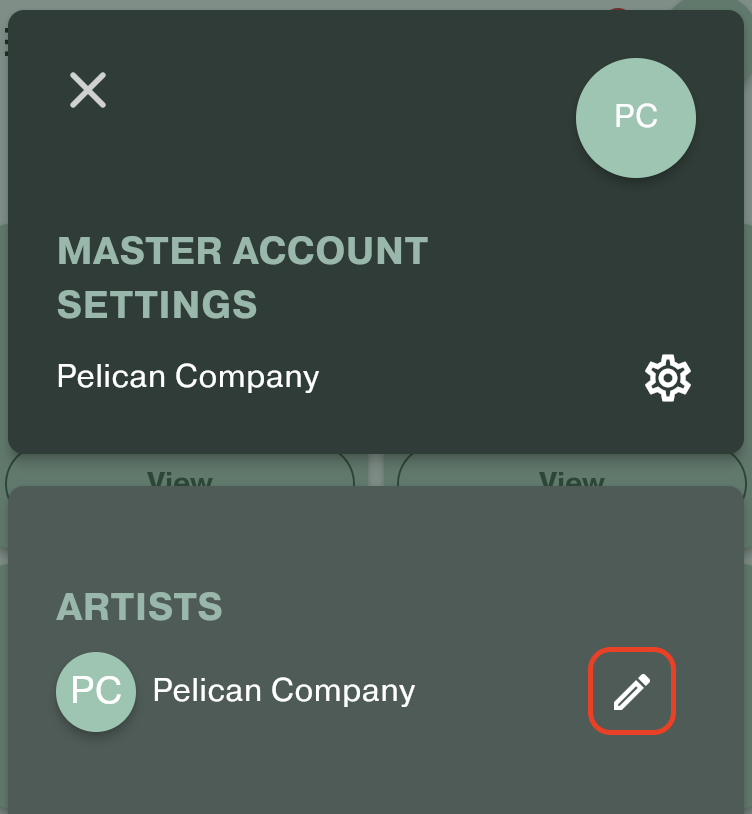
- Have the artist change their name in the Labelcaster platform by clicking the edit icon in the profile menu (top right).
- Notify [email protected] that the name change has been made and request updates on DSPs. Include any affected releases (artist name, release title, UPC code), so we can deliver the metadata update to all DSPs.
- Once the new artist name is updated on DSPs, work with your artist to claim these new profiles. See the article below for guidance: